
What Is a CPU Cooling Fan and How Does It Work?

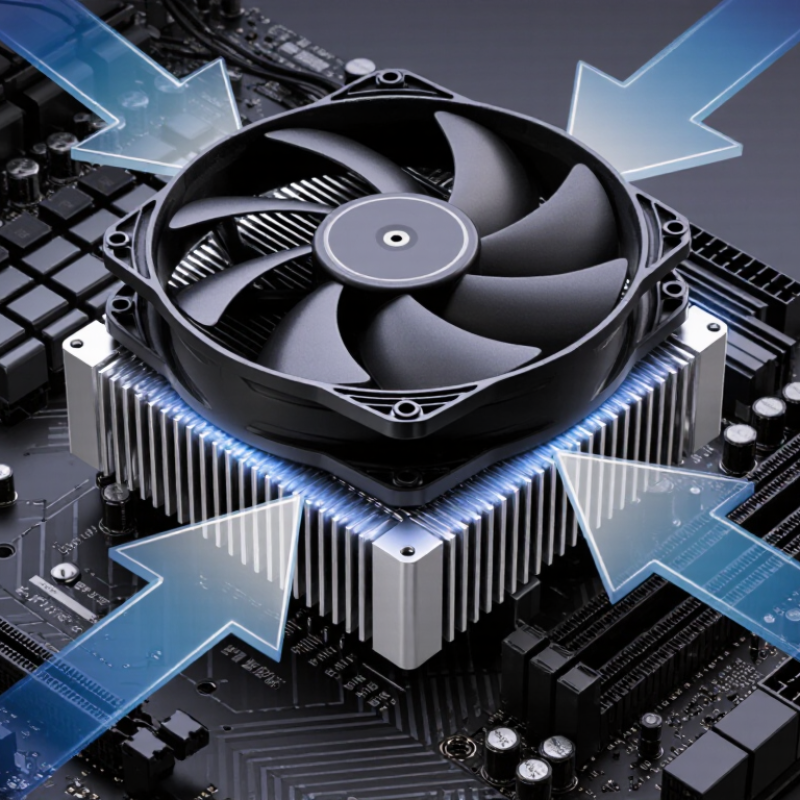
A Cpu Cooling Fan is a small component with a demanding job. It removes heat from the processor and protects system stability during everyday use. Under the metal heatsink, thermal paste fills microscopic gaps between the CPU and cooling surface. Heat then travels into the heatsink’s fins. The fan pushes air through those fins, carrying warmth away from the processor area.

The process sounds simple. It is not always simple. Airflow direction, fan speed, heatsink design, dust, and room temperature all influence results. A powerful fan may cool effectively, yet create distracting noise. A quiet fan may struggle inside a cramped case. Noctua CEO Roland Mossig has expressed the central idea clearly: “Good cooling is always a balance between performance, noise, and reliability.” That balance matters when a computer renders video, runs games, or handles long workloads.

This guide will explain what a Cpu Cooling Fan does, how its motor and blades move air, and how temperature control works in practice. It will also examine PWM control, bearing types, airflow pressure, and common installation mistakes. A fan cannot solve every thermal problem. Poor cable management can block airflow. Old thermal paste can reduce heat transfer. Dust can turn clean fins into a gray blanket. These details are easy to overlook. They are often the real reason a system runs hot. Understanding the complete cooling path helps readers choose, install, and maintain a more dependable solution. Even experienced builders sometimes underestimate case airflow.
What Is a CPU Cooling Fan and How Does It Work?

CPU Cooling Fans: Definition and Core Purpose

CPU Cooling Fans: Definition and Core Purpose

A CPU cooling fan is a compact airflow device that helps remove heat from a computer’s processor. The processor creates heat whenever it handles calculations, games, or demanding software. Without controlled cooling, temperatures can rise quickly. High heat may reduce performance, cause sudden shutdowns, or shorten component life.

The fan usually sits above a metal heatsink. Thermal paste fills tiny gaps between the processor and heatsink surface. Heat moves into the metal, and the fan pushes cooler air across its fins. Warm air then travels toward the case exhaust vents. In practical testing, a steady airflow pattern often matters more than maximum fan speed. Faster is not always better. It can create distracting noise and may collect dust faster.

Many cooling fans change speed according to temperature readings. Light tasks may produce only a soft hum. Heavy workloads can make the blades spin noticeably faster. I once assumed louder cooling always meant better cooling, but that was too simple. Poor cable placement and blocked vents can reduce airflow despite high RPM. Regular dust removal helps, although cleaning too aggressively can damage delicate fan blades. A worn bearing may produce clicking or grinding sounds. That warning deserves attention before cooling performance becomes unstable.

Key Components of a CPU Cooling Fan

A CPU cooling fan is not a single part. It is a small airflow system built around several coordinated components. The fan blades push air through the frame. Their angle and shape influence airflow, noise, and static pressure. The central hub holds the blades and connects them to the motor. Inside the hub, the motor converts electrical power into rotation. Bearings support the shaft and reduce friction. Worn bearings may produce a dry rattling sound.

The heatsink is equally important. Its metal fins create more surface area for releasing heat from the processor. A flat base transfers heat from the CPU into those fins. Thermal paste fills microscopic gaps between both surfaces. Too little paste can leave air pockets. Too much may spread unevenly. I have seen a clean fan perform poorly because its heatsink contact was not even.

The frame keeps the blades aligned and guides air toward the heatsink. Mounting clips or screws hold the cooler firmly above the processor. A control cable sends power and speed information to the motherboard. Pulse-width control can adjust speed according to temperature. Some systems also use a temperature sensor near the motor. Dust changes the balance of the blades. That small detail is easy to overlook. A fan may still spin, yet move much less air. Checking blade clearance, cable tension, and heatsink dust gives a more reliable diagnosis than listening alone.

How a CPU Cooling Fan Moves Heat Away

What Is a CPU Cooling Fan and How Does It Work?

A CPU cooling fan helps move heat away from the processor during demanding tasks. The processor creates heat as electrical energy passes through its tiny circuits. A metal heatsink receives that heat through a thin layer of thermal compound. The fan then pushes air across the heatsink’s fins. Warm air leaves the fins, while cooler case air replaces it. This repeated movement keeps the CPU within a safer operating range.

The fan does not remove heat by itself. It supports the complete cooling path. If the thermal compound spreads poorly, heat may remain trapped above the processor. If the case airflow is restricted, the fan may only circulate warm air. During routine PC maintenance, I have seen dust form a soft blanket over the fins. Temperatures then rise, even when the fan spins normally. Fan speed often increases under load, but louder noise does not always mean better cooling. That assumption needs reconsideration.

Tips: Keep the heatsink fins clean and leave space around the computer’s air vents. Check CPU temperatures during gaming, rendering, or other heavy work. A sudden rise may indicate dust, a loose heatsink, or aging thermal compound. Avoid judging cooling by sound alone. A quiet fan can still move enough air. Yet fan settings are imperfect, so occasional temperature checks remain useful.

What Is a CPU Cooling Fan and How Does It Work?

A CPU cooling fan moves heat away by forcing air through a heatsink. The chart shows the theoretical heat-carrying capacity of airflow at a 10°C air-temperature rise, calculated using air density of 1.2 kg/m³ and specific heat capacity of 1,005 J/kg·K. Actual cooling is lower because of heat-transfer and airflow losses.

The Fan’s Role in Maintaining Processor Temperature

A CPU cooling fan helps maintain a processor’s temperature by moving heat away from its metal heatsink. The processor produces heat whenever it handles calculations, games, or background tasks. Without steady airflow, that heat can build quickly around the chip. The fan pushes cooler air across the heatsink fins, while the fins spread heat over a larger surface. This simple movement protects performance and system stability.

In a desktop computer, temperature sensors usually guide the fan’s speed. Light workloads may produce a soft, slow hum. During video editing or heavy gaming, the fan may spin faster and become clearly audible. The change is normal. A fan that never speeds up, however, deserves attention. Dust can block the fins, and loose mounting can reduce contact between the processor and heatsink. I have found that even a thin dust layer can make temperatures rise more than expected.

Fan performance also depends on the whole airflow path. Cool air needs an entrance, while warm air needs an exit. Poor cable placement or a crowded case can trap heat near the processor. Thermal paste fills tiny gaps between the chip and heatsink, but it is not a permanent solution to every cooling problem. My earlier assumption that a faster fan always meant better cooling was incomplete. Noise, airflow direction, dust, and heatsink design matter too. Small details matter.

What Is a CPU Cooling Fan and How Does It Work? - The Fan’s Role in Maintaining Processor Temperature

Data Dimension Typical Value or Range How It Affects Cooling Practical Notes
Primary purpose Move heat away from the CPU heatsink Airflow carries heat from the metal fins into the computer case The fan removes heat; it does not generate cooling by itself
Main components Motor, hub, blades, frame, bearing, and control circuit Each part contributes to airflow, rotation, noise, or reliability A balanced blade design helps reduce vibration and acoustic noise
Common fan diameter 80 mm, 92 mm, 120 mm, or 140 mm Larger fans can move similar air volumes at lower rotational speeds The case or heatsink must support the selected mounting size
Typical rotational speed Approximately 600–3,000 revolutions per minute Higher speed generally increases airflow and static pressure Higher speed also tends to increase noise and power consumption
Airflow rating Roughly 20–100 cubic feet per minute Higher airflow can remove more heat when the air path is unobstructed Measured airflow does not always represent performance inside a restricted case
Static pressure Often about 0.5–3.0 mmH₂O for computer fans Higher static pressure helps push air through dense heatsink fins or filters Important for CPU heatsinks, radiators, dust filters, and narrow vents
Electrical input Commonly 12 V DC; some small fans use 5 V The motor converts electrical energy into rotational motion The fan voltage must match the motherboard header or controller
Fan control method Voltage control or PWM control Control signals adjust fan speed according to temperature or system load PWM control commonly provides more precise speed adjustment
Heat transfer path CPU die → thermal interface material → heatsink → air Every stage adds thermal resistance between the processor and surrounding air Good contact and clean heatsink fins are essential for effective cooling
Typical idle CPU temperature Approximately 30–50°C, depending on room temperature and system design Low processor power allows the fan to run slowly or intermittently Idle temperature is strongly affected by ambient temperature and background tasks
Typical sustained-load CPU temperature Approximately 60–90°C, depending on processor power and cooler capacity The fan usually increases speed to maintain safe operating conditions Temperature limits vary by processor design; consult the processor specifications
Noise level Approximately 15–40 dBA for many desktop cooling fans Noise rises with blade speed, turbulence, vibration, and bearing wear A larger, slower fan may provide quieter cooling than a smaller, faster fan
Bearing types Sleeve, ball, and fluid-based bearing designs Bearing design influences friction, noise, orientation tolerance, and service life Operating conditions and dust exposure affect actual lifespan
Dust and airflow restriction Can substantially reduce effective airflow over time Blocked fins and filters increase resistance and reduce heat removal Regular cleaning helps maintain airflow and prevent unnecessary fan speed increases
Fan failure symptoms Rising temperatures, sudden shutdowns, noise, or a non-spinning fan Reduced airflow allows heat to accumulate around the processor Stop using the system if temperatures become abnormally high or unstable

Note: Actual cooling performance depends on processor power, room temperature, heatsink design, thermal interface quality, case airflow, fan speed, and dust levels.

Factors That Affect CPU Fan Performance

What Is a CPU Cooling Fan and How Does It Work?

A CPU cooling fan removes heat from the processor through a heatsink and moving air. The heatsink absorbs heat from the CPU surface, while the fan pushes cooler air across its metal fins. Fan performance depends on several practical factors. Dust can block airflow and form a soft gray layer between the blades. Poor cable placement may also disturb air movement inside the case. I have seen a clean fan reduce operating noise noticeably, even without changing its speed.

Room temperature matters. A computer in a warm, poorly ventilated room starts with less cooling capacity. Fan speed, measured in revolutions per minute, also affects performance, but faster is not always better. High speed can increase noise without producing useful temperature gains. Static pressure becomes important when air must pass through dense fins or restricted vents. The thermal paste between the CPU and heatsink matters too. Old or uneven paste can leave tiny air gaps. That mistake is easy to overlook.

Tips: Clean the fan and heatsink every few months. Check temperatures during demanding tasks, not only at idle. Keep intake and exhaust vents unobstructed. Set a gradual fan curve instead of forcing maximum speed. My own early tests focused too much on fan speed. I later found that balanced airflow and careful mounting often mattered more. Temperature readings can vary, so compare results under similar workloads.

t