How to Print Labels Efficiently for All Your Needs?
Label printing is an essential task for various needs, be it for home organization or business purposes. Efficient printing labels can significantly streamline your workflow. The right approach can save you time and frustration.
When faced with diverse labeling needs, a few key factors come into play. The choice of materials matters. Selecting suitable label stock ensures durability and adherence. Equipping yourself with the right printer also makes a difference. Some printers excel at specific tasks while others are more versatile.
Many people struggle with label designs and layouts. Simplicity can be powerful, yet creativity adds flair. Experimentation might lead to frustrating outcomes at first. However, each attempt offers valuable learning experiences. Printing labels with clarity can impact how others perceive your organization, whether professional or personal.
Choosing the Right Label Design for Your Needs
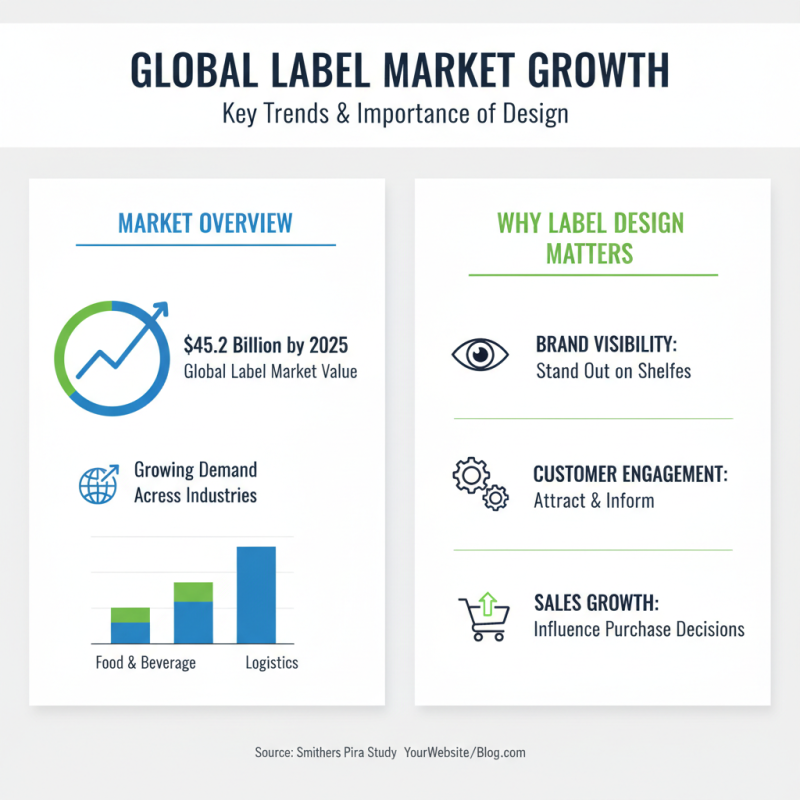
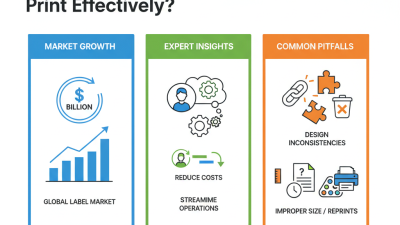
Choosing the right label design is vital for various needs. According to a study by Smithers Pira, the global label market is expected to reach $45.2 billion by 2025. This indicates a growing demand for customized labels across industries. Detailed and attractive labels enhance brand visibility and customer engagement.
When designing labels, consider your audience. Colors, fonts, and images convey messages. Research shows that 93% of consumers make purchases based on visual appearance. Simple designs can be effective, but don't underestimate the power of unique shapes. Custom die-cut labels can create a memorable impact. However, too many elements may confuse buyers.
It’s essential to reflect on your design process. Are you overlooking critical aspects? Small details matter, especially in compliance and clarity. Data from the Label and Packaging Industry report highlights the challenges of ensuring correct information on labels. An unclear or misleading label can damage credibility. Prioritize clarity, but don't shy away from creativity. Balancing both can lead to successful label designs.
Selecting the Appropriate Printing Method for Labels
When selecting the appropriate printing method for labels, consider your unique needs. Different situations might demand different approaches. Digital printing suits small runs, while flexography works for large quantities. Each method has its strengths and weaknesses.
Think about your label material too. Paper labels are often cheaper, but vinyl offers durability. You might choose based on where the labels will be used. Labels exposed to moisture need more robust solutions. Experimenting with different materials can be a slow process. You may find some unexpected results.
Don't overlook the importance of design. An effective label must balance usability with aesthetics. Poor design choices can lead to confusion. It’s essential to sketch out your ideas before finalizing. Keep refining your concepts until they resonate. Evaluation and revision are key parts of efficient label printing.
Preparing Your Data for Efficient Label Printing
Preparing your data for efficient label printing is crucial for a smooth process. Start by gathering all necessary information. Data can include names, addresses, or product details. A well-organized spreadsheet can save you time later. Ensure all entries are accurate. Mistakes can lead to wasted labels and frustration.
Consider the layout of your labels. Pay attention to size and design. Simple layouts often work best. Align text properly to avoid cutting off important information during printing. It might be necessary to make adjustments after printing a test label. Small errors can come up, and correcting them can be tedious.
Don't forget about the printing environment. Ensure your printer is functioning well and loaded with the right supplies. Test prints can reveal issues you might not have noticed. Take note of any inconsistencies in print quality. This can impact your overall project. Reflect on these details to ensure successful and efficient label printing.
How to Print Labels Efficiently for All Your Needs? - Preparing Your Data for Efficient Label Printing
| Label Type |
Data Format |
Quantity |
Printer Type |
Use Case |
| Shipping Label |
CSV |
50 |
Thermal Printer |
E-commerce Shipping |
| Product Label |
Excel |
100 |
Inkjet Printer |
Retail Products |
| Address Label |
PDF |
200 |
Laser Printer |
Mailing |
| Barcode Label |
XML |
75 |
Dot Matrix Printer |
Inventory Management |
| Warehouse Label |
SQL Database |
150 |
Thermal Printer |
Product Organization |
Optimizing Label Printer Settings for Quality and Speed
When printing labels, adjusting printer settings is key. A well-optimized printer can save time and improve quality. Start by
selecting the right print resolution. A higher DPI usually means clearer text and images, but it can slow down the printing process. Sometimes, balancing clarity and speed is tricky. Try lower settings for routine labels and
save high resolutions for critical projects.
Paper type also plays a vital role. Different materials can cause smudging or misprints. Testing a few varieties before
making a bulk order can save headaches later. Remember to keep the printer clean. Dust and residue can affect print quality. Regular maintenance is easy to overlook but essential for optimal performance.
Lastly, avoid overloading the printer with too many labels at once. This can lead to jams and wasted materials. Start small and increase gradually.
Reflecting on your process is important. What works well today may not be the best tomorrow. Stay flexible and adjust as needed.
Organizing Your Labels for Easy Access and Use
Organizing labels can feel overwhelming. Many people struggle with finding the right labels when they need them. A simple system can transform this chaos into order. Start by categorizing your labels based on usage. For example, group ones for shipping, crafting, or household organization. This creates clear sections for quick access.
Consider using boxes or drawers for storage. Label these containers clearly. Smaller labels can easily get lost in large bundles. It helps to keep a master list of all labels. This might seem tedious, but it saves time later. Reflect on how often you use each type of label. Sometimes, we hold onto labels we rarely use. It might be wise to let go of these extras.
Regularly revisiting your label organization can be beneficial. Things change, and so do your labeling needs. Adjust your system as necessary. Making space for new labels is essential. Keeping your labeling supplies tidy prevents frustration. Ultimately, a bit of planning leads to a smoother experience when printing and using labels.